Zero Trust Security Bahrain Guide (for SMEs)
Ten years ago, protecting a business in Manama was mostly about protecting a building. You bought a firewall, you put your servers in a locked room, and anything inside that network was treated as safe. That model worked because work happened in one place. It doesn’t work anymore, and most business owners already sense it. Your accountant opens the finance system from a laptop at home in Riffa. Your sales team pulls up customer records on their phones between site visits. Your files live in Microsoft 365, not in a cabinet down the hall. The “perimeter” you were defending has quietly dissolved. I’ve spent a good part of the last few years sitting across the table from Bahraini business owners after something has gone wrong — a compromised email account, a supplier payment redirected to the wrong IBAN, a ransomware note on a shared drive. The pattern is almost always the same. The attacker didn’t smash through the firewall. They logged in. With a real password, through a real account, and the network welcomed them because the network had been told to trust anyone already inside. (Internal link: cyber security services in Bahrain) Zero Trust flips that assumption. This guide explains what it actually means for a small or mid-sized business in the Kingdom, what it costs, and how to roll it out in stages without an enterprise budget. What Is Zero Trust Security? Zero Trust is a security approach built on one blunt rule: trust nobody by default. Think about how a good hotel works. The front door is open to everyone — you can walk into the lobby without being questioned. But your keycard only opens your room. It won’t open the room next door, it won’t open the staff office, and it won’t open the manager’s safe. The hotel doesn’t assume you’re a thief. It simply refuses to hand out access it doesn’t need to hand out. Traditional network security works like an old apartment building instead. Once you’re past the main gate, every door inside is unlocked. Get in once, go anywhere. Zero Trust architecture, explained plainly, means three things happen every single time someone connects: Who — the system checks your identity. What device — the system checks the device you’re on and whether it’s healthy. How much — you get only what you need for that task, and the system keeps watching. There’s no permanent “safe zone”. A finance manager sitting in your Seef office gets checked the same way she would from an airport lounge in Dubai. Why SMEs in Bahrain Need Zero Trust There’s a myth that attackers only chase big banks and government entities. In practice, smaller firms get hit more often, because they’re easier and because criminals now automate the hunt. Hybrid and Remote Work Staff move between office, home and client sites. Their laptops connect through networks you don’t control and never will. Cloud Applications Your email, CRM, accounting platform and file storage are outside your walls. A firewall in your server room cannot protect a login that happens in Microsoft’s data centre. (Internal link: cloud solutions) Personal Devices People check work email on personal phones. That’s reality, not a policy failure. Insider Risk — Usually Accidental Most internal incidents I’ve investigated weren’t sabotage. Someone clicked a convincing invoice, or a departing employee still had access to a shared folder nine months later. Business Continuity and Reputation For a mid-sized company here, three days of downtime can cost more than a year of security spending. And under Bahrain’s Personal Data Protection Law, mishandling customer data carries consequences beyond the technical cleanup. (Internal link: managed IT services) Regulated sectors feel this hardest. Financial institutions answer to Central Bank of Bahrain cybersecurity requirements, healthcare providers hold sensitive patient records, and retailers process card data daily. Zero Trust maps neatly onto all of it. The Core Principles of Zero Trust Verify Every User Passwords alone are finished. Verify identity with a second factor every time, and verify it more strictly when something looks unusual — a new country, an odd hour, an unfamiliar device. Verify Every Device A correct password from a laptop riddled with malware is still a breach in progress. Devices should prove they’re patched, encrypted and running working security software before they get access. (Internal link: endpoint security) Least Privilege Access Give people the minimum access their job requires. Nothing extra, nothing inherited from an old role, nothing “just in case”. Continuous Monitoring Access isn’t granted once and forgotten. Behaviour is watched throughout the session, and access can be pulled the moment something looks wrong. (Internal link: 24/7 SOC monitoring) Assume Breach Plan as though an attacker is already inside. Segment the network, limit what any single account can reach, and make lateral movement difficult. This one principle changes an incident from a company-wide disaster into a contained annoyance. Zero Trust vs Traditional Security Aspect Traditional Perimeter Security Zero Trust Security Core assumption Inside the network is safe Nothing is trusted by default Verification Once, at login Continuous, at every request Access scope Broad network access Narrow, per-application access Device checks Rarely enforced Health and posture checked every time Remote work fit Weak, VPN-dependent Built for it Cloud and SaaS coverage Limited Native If credentials are stolen Attacker roams freely Attacker is boxed in Insider threat handling Poor Strong Visibility Perimeter logs only Full identity, device and app telemetry Best suited to Fixed offices, on-premise systems Hybrid teams, cloud-first businesses Zero Trust vs VPN VPNs still have a place — they’re not obsolete. But they were designed to extend your office network to a laptop, and that’s a very different goal from verifying every request. Factor VPN Zero Trust Access What it grants Access to the whole network Access to one specific application Identity checks At connection only Continuous Device health checks Usually none Required Damage if credentials leak Wide network exposure Limited to one approved app User experience Slower, connection drops Seamless, no tunnel to launch
Ransomware Prevention Bahrain Trends & Protection 2026
There is a moment in every ransomware incident I have worked on where the conversation stops being technical. It usually happens about ninety minutes in, once the servers are confirmed encrypted and someone from finance walks in and asks a very simple question: when can we invoice again? That is the honest measure of a ransomware attack. Not the malware family, not the encryption algorithm, not the note left on the desktop. The measure is how many days a business cannot bill, ship, dispense, teach, or serve customers — and whether it can survive that gap. For Bahraini businesses heading through 2026, this shift matters. Ransomware has quietly moved off the IT department’s risk register and onto the board’s continuity plan. Verizon’s 2026 Data Breach Investigations Report found ransomware present in 48% of all analysed breaches, up from 44% the previous year — and notably, 96% of ransomware victims where organisation size was known were small and medium businesses. That last figure deserves a second read by every SME owner in Manama, Riffa or Sitra who has assumed attackers only chase large enterprises. This guide explains what has changed, how organisations actually get infected, what an incident really costs, and — most importantly — what you can put in place this quarter without a nine-figure security budget. What Is Ransomware, in Plain Language Ransomware is malicious software that locks an organisation out of its own data, then demands payment to unlock it. Files are encrypted. Systems stop responding. A ransom note appears with a countdown and a contact channel. The definition is simple. The modern reality is not. How a Modern Ransomware Attack Actually Unfolds Attackers rarely encrypt anything on day one. A typical intrusion follows a pattern that security teams now recognise clearly: Initial access. Someone gets in — through an unpatched firewall or VPN appliance, a stolen password, or a convincing email. Quiet reconnaissance. The intruder maps your network, identifies your domain controllers, and finds where your finance and HR data live. This phase often runs for days. Privilege escalation. They work toward administrator rights, because admin rights make everything else easy. Backup destruction. Backups are attacked before production data. Attackers know that a business with clean, recoverable backups will not pay. Data theft. Sensitive files are copied out. This is the step most business owners underestimate. Encryption and extortion. Only now does the ransom note appear. That sixth step is why “double extortion” has become standard practice. Even if you restore perfectly from backup, the attacker still holds copies of your customer records, contracts and payroll files, and threatens to publish them. Sophos noted in its 2025 manufacturing sector research that more than half of the ransomware incidents handled by its emergency response team involved both data theft and encryption. The practical consequence: backup alone no longer resolves a ransomware incident. It resolves the downtime half. It does nothing about the disclosure half. The Most Common Infection Routes Exploitation of unpatched internet-facing systems — firewalls, VPN gateways, web applications and mail servers Stolen or reused credentials, frequently harvested by infostealer malware months earlier Phishing and business email compromise Exposed Remote Desktop Protocol (RDP) services Compromised suppliers, IT vendors and managed platforms Fake software updates and pirated applications Removable media, including USB drives brought in from home Ransomware Trends in Bahrain and the GCC (2026) Bahrain-specific ransomware data is limited, and it is worth saying that plainly rather than inventing numbers. Public disclosure is not mandatory for every private-sector incident here, and many attacks on SMEs are handled quietly. Industry research citing the National Cyber Security Centre records only seven domestic ransomware victims logged between 2022 and 2026 — a figure that reflects reported cases, not the true volume of incidents. Where Bahrain-specific figures are unavailable, regional and global data from established sources gives a defensible picture. The Numbers Worth Knowing Regional breach costs are among the highest in the world. IBM’s 2026 Cost of a Data Breach Report put the average breach cost for Middle East organisations at USD 8 million, with lost business alone averaging USD 3.57 million per incident. Financial services and technology firms recorded the highest average costs at USD 10.67 million. AI is now measurably part of the attack side. In that same IBM research, 26% of malicious breaches in the region were AI-enabled, with a further 11% of respondents unable to say either way. Unpatched software has overtaken stolen passwords as the leading way in. The 2026 Verizon DBIR recorded vulnerability exploitation as the top initial access vector at 31% of breaches, up from 20% the year before. IBM X-Force separately observed a 44% increase in attacks beginning with the exploitation of public-facing applications. The criminal ecosystem is expanding, not consolidating. X-Force counted a 49% year-on-year rise in active ransomware and extortion groups. More groups means more opportunistic targeting of mid-sized organisations. Supply chain risk is compounding. Third-party involvement in breaches grew 60% year over year, reaching 48% of confirmed breaches in the 2026 DBIR. X-Force reports large supply chain compromises have risen roughly fourfold since 2020. Credential theft is an early warning of ransomware. DBIR analysis found that 50% of ransomware victims had a credential or infostealer event within the 95 days preceding the attack. What This Means Specifically for Bahrain Four local conditions change the risk calculation here. Fast, deliberate cloud adoption. Bahrain’s Cloud-First policy pushed the overwhelming majority of government workloads onto hyperscale platforms, and the private sector followed. Cloud is not inherently less safe — but it moves the security boundary to identity. If a Microsoft 365 administrator account has no MFA, the firewall protecting your office is largely irrelevant. Hybrid and remote work is now permanent Staff connect from home networks, personal laptops and mobile devices. Each connection is a potential entry point that never appears in a traditional network diagram. A dense, interdependent business community Bahrain’s commercial advantage,everyone works with everyone is also a lateral movement path. Compromise a small accounting firm and you may
IT AMC Bahrain: Why Your Business Needs One in 2026
Why every business Needs an IT AMC Bahrain in 2026?Ask any operations manager in Manama what keeps them up at night, and IT rarely tops the list, until the morning the accounts server refuses to boot during month-end closing. That is the strange thing about technology in business. It is invisible when it works and catastrophic when it doesn’t. A decade ago, a dead PC meant one employee sat idle for a day. Today, a failed switch in your server room can stop invoicing, halt the point-of-sale terminals in three branches, cut off the sales team’s access to email, and leave your customers wondering why nobody is answering. Bahrain’s business environment has shifted quickly. Cloud adoption accelerated after the government’s cloud-first policy, hybrid work stuck around after the pandemic rather than fading, and data protection obligations under the Personal Data Protection Law gave every company a legal reason to care about how its systems are secured. Meanwhile, the threats got smarter and the tolerance for downtime got thinner. Which brings us to a question a lot of Bahraini business owners are finally asking out loud: is it still sensible to call an IT technician only after something breaks? For most companies, the honest answer is no. And that is exactly the gap an IT AMC in Bahrain is designed to close. Reactive vs Proactive IT Support Most small and mid-sized businesses in Bahrain start out reactive. It feels economical. You don’t pay anyone until something goes wrong, and when it does, you call a technician, pay the callout charge, and move on. Reactive IT support is essentially firefighting. The problem announces itself — a server crashes, a printer disappears from the network, ransomware encrypts a shared folder — and the response begins after the damage has already started. Proactive IT maintenance flips the sequence. Systems are monitored continuously, patches are applied on schedule, backups are tested rather than assumed, hardware health is checked before components fail, and small anomalies get investigated while they are still small. Here is a real pattern we see repeatedly in Bahrain. A company’s file server has one failing drive in a RAID array. Under a reactive model, nobody notices — the array is tolerating the failure quietly. Three months later a second drive fails, the array collapses, and the business discovers its last usable backup is eleven weeks old. What should have been a BD 90 drive replacement becomes a week of chaos and, in several cases we’ve seen, permanently lost data. Under a proactive model, that first drive failure triggers an alert on day one. An engineer swaps it during off-hours. Nobody in the business ever finds out it happened. Reactive vs Proactive: Side-by-Side Comparison Factor Reactive IT Support Proactive IT Maintenance (AMC) When action happens After failure Before failure Cost structure Unpredictable, spikes during crises Fixed annual fee, budgeted in advance Response time Depends on technician availability Defined SLA, priority queue Downtime Hours to days Minutes, often zero Backup verification Rarely tested Tested on a set schedule Security patching Whenever someone remembers Scheduled and documented Hardware lifespan Shortened by heat, dust, neglect Extended through routine servicing Business risk Carried entirely by you Shared with your IT partner Documentation Usually none Asset register, network map, reports Best suited to Home offices, 1–3 devices Any business that loses money when systems stop The pattern is straightforward. Reactive support is cheaper on paper and far more expensive in practice. The Hidden Cost of IT Downtime for Businesses When business owners calculate the cost of downtime, they usually think about the repair invoice. That is the smallest number in the equation. Lost productivity Take a 25-person company where the average fully loaded salary cost is BD 700 a month. That’s roughly BD 4 per working hour per employee. A four-hour outage that stops everyone from working costs BD 400 in wages alone — for people sitting in an office, unable to do the job they were paid for. Run that math on your own headcount before you decide an AMC is expensive. Direct revenue loss For a retail chain, a POS outage during peak evening hours means transactions that simply never happen. For a logistics firm, a warehouse management system failure means trucks idling in Sitra. For a clinic, it means appointments cancelled and rescheduled. These sales don’t get postponed to tomorrow. They are gone. Damaged customer trust This is the cost nobody puts in a spreadsheet, and it is often the largest. A customer who emails you twice and gets no reply because your mail server was offline doesn’t know why. They just conclude you’re unresponsive. In a market as compact and relationship-driven as Bahrain, where reputation moves fast through business circles, that impression is expensive to reverse. Emergency repair premiums Urgent, out-of-hours callouts cost significantly more than scheduled maintenance. Add express shipping for a replacement part that isn’t in stock locally, and a single incident can consume a meaningful chunk of what a full year of AMC coverage would have cost. Security exposure Unpatched systems are the single most common entry point for ransomware. Attackers scan continuously for known vulnerabilities in Windows Server, firewalls, VPN appliances, and remote desktop services. Once inside, they encrypt shared drives and demand payment. Under Bahrain’s Personal Data Protection Law, a breach involving customer data brings regulatory obligations on top of operational recovery — a compliance problem stacked on an IT problem. What Is an IT AMC? An IT Annual Maintenance Contract (AMC) is a service agreement in which an IT company takes responsibility for maintaining your technology infrastructure for a fixed period — usually twelve months, in exchange for an agreed fee. Think of it the way you think about servicing your fleet vehicles. You don’t wait for the engine to seize before booking a service. You do it on a schedule, because scheduled servicing is cheaper than an engine rebuild and far cheaper than a vehicle stuck on the Shaikh Khalifa Highway. A properly structured IT support
SOC vs Traditional IT Monitoring: What’s the Difference?
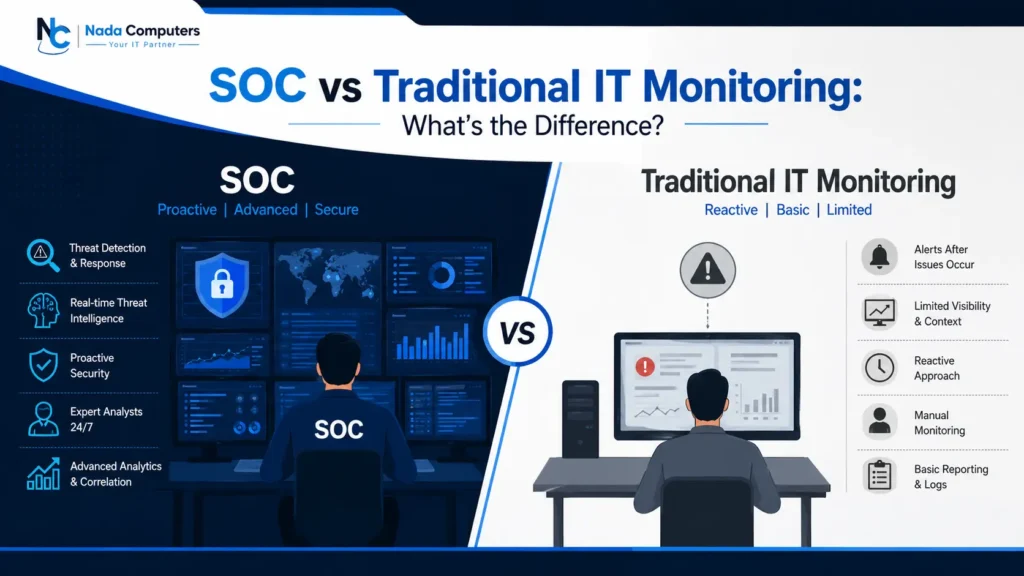
Do you know about SOC vs traditional IT monitoring? Ask an IT manager in Manama what “monitoring” meant ten years ago and you get the same answer. A screen showed whether the servers were up, whether the internet link was alive, and whether last night’s backup finished. If something turned red, someone raised a ticket. That worked, because most problems then were mechanical, a failed disk, an overloaded switch, a link that dropped in a storm. Attacks have moved on. A modern intrusion rarely knocks anything over. It borrows a valid username, logs in during working hours from a plausible location, reads a few mailboxes, then copies data out over an encrypted connection that looks like ordinary web traffic. Nothing crashes. No alert fires. Uptime stays at 100%. That is the uncomfortable part: your network can look perfectly healthy on every dashboard you own while somebody is already inside it. This article explains what traditional monitoring actually does, what a Security Operations Center does differently, and how to judge which one your business in Bahrain needs. What is Traditional IT Monitoring? Traditional IT monitoring is health monitoring. Its job is to tell you whether your technology is working — not whether it is safe. How it works Most setups follow the same pattern. Agents sit on servers and workstations, network devices are polled using SNMP, and thresholds are set: alert if a disk passes 85% capacity, alert if a server stops responding for two minutes, alert if CPU stays above 90%. When a threshold breaks, the system emails the IT team or opens a ticket. It handles a defined list of questions well: For availability, this is genuinely useful. Nada Computers uses the same discipline inside our own Managed IT Services — you cannot secure infrastructure you are not measuring. Where it stops The gap appears the moment the question changes from “is it working?” to “is somebody abusing it?” A familiar scenario A retail group in Seef ran a solid monitoring stack across four branches. A finance employee opened an invoice attachment that installed a credential stealer. Over eleven days, the attacker logged into the accounts mailbox with the stolen password, created a rule to hide replies, and altered supplier bank details on two outgoing payments. Every server stayed green. Uptime for the month was 99.98%. The loss was found by the supplier, not the IT team — because nothing had broken, and health monitoring only reports things that break. What is a Security Operations Center (SOC)? A Security Operations Center is a team of security specialists, supported by detection technology and defined procedures, whose only job is to watch for signs of attack and act on them. The simplest way to picture it: traditional monitoring is the building management system tracking lifts, air conditioning and lighting. A SOC is the control room where trained officers watch the cameras, recognise behaviour that does not belong, and send someone to intervene. Round-the-clock coverage A SOC runs on shift rotations, so a qualified analyst is always watching — 3 AM on a Tuesday, the second Friday of Ramadan, the morning of Eid. Attackers deliberately choose the hours when nobody is looking, which is why coverage cannot follow office timings. Detection built on behaviour Instead of waiting for a threshold to break, a SOC hunts for patterns that suggest an intruder: impossible travel between logins, a service account suddenly browsing file shares, PowerShell launching from a Word document, admin rights granted outside the change window, backups deleted just before encryption starts. The analysts People remain the core of a SOC. Tier 1 analysts triage alerts and filter noise. Tier 2 analysts investigate what survives — pulling logs, checking endpoints, reconstructing sequence and scope. Tier 3 engineers hunt the quiet cases and tune detection rules. Threat intelligence A SOC works from current knowledge of which attack groups are active in the Gulf, which vulnerabilities are being exploited this week, and which malicious infrastructure has been seen recently. That intelligence becomes detection rules, so an attack observed at one organisation strengthens the defence of the next. Continuous improvement Every incident feeds back in. Rules get tuned, false positives removed, playbooks updated, coverage gaps closed. Protection improves month over month instead of ageing quietly. SOC vs Traditional IT Monitoring Factor Traditional IT Monitoring Security Operations Center (SOC) Monitoring hours Tool runs continuously, humans review during office hours 24/7/365 analyst coverage across shifts What is watched Uptime, CPU, memory, disk, bandwidth, backup jobs Authentication, endpoints, email, cloud, firewall and application logs Threat detection Signature-based antivirus alerts; performance anomalies Behavioural detection, correlation across sources, threat hunting Incident response Ticket raised, handled during working hours Defined playbooks, containment and escalation within minutes Automation Threshold alerts and scheduled scripts Automated enrichment, isolation of infected endpoints, account disablement Visibility Device-by-device, mostly on-premises Unified view across on-premises, cloud, Microsoft 365 and remote devices Compliance Limited reporting value Audit-ready logs, retention, incident records mapped to regulatory requirements Business continuity Recovery begins after damage appears Early containment limits the blast radius before operations stop Cost Low direct cost, high exposure to a single serious breach Predictable monthly cost, sharply lower probability of a major loss Risk reduction Reduces downtime risk Reduces downtime, data loss, financial fraud and regulatory risk Neither replaces the other. Availability monitoring keeps the business running day to day; a SOC keeps it from being taken apart quietly. Most breached organisations have the first and lack the second. SOC vs NOC The terms sound similar and are often confused, which causes real problems when a company assumes its NOC contract already covers security. A Network Operations Center (NOC) keeps services available and performing well. A Security Operations Center (SOC) keeps them protected from deliberate attack. Different objectives, different skills, different success measures. Aspect NOC SOC Primary goal Availability and performance Protection against threats Typical trigger Outage, latency, capacity issue Suspicious login, malware, data exfiltration Opponent Faults, failures, congestion Human attackers who adapt Core skills Network and systems engineering Security